





Roaming Tips
Stay connected and manage your costs with these simple tips for seamless voice and data roaming.
The following tips will tell you the major points to note while traveling abroad with your handset and how to avoid unnecessary roaming charges so as to enjoy a hassle-free journey.
1. Log on to an overseas network while roaming
While overseas, your mobile phone automatically selects a roaming network for you. If your handset cannot be connected to a local network, you can select a network using the "Manual Network Selection" function. Please refer to handset manufacturers' user manual or call our hotline at 2888 1010 for details.
2. Making calls to Hong Kong / other destinations when you are abroad
Calling Back to Hong Kong / Other Regions
Landline:
Mobile Number:
Examples:
HK Landline:
HK Mobile:
Calling a Local Number
Landline:
Mobile Number:
Examples:
Guangzhou Landline:
China Mobile:
Note:
If the [+] symbol is not available, you can try common international direct dialing
numbers like
[00], [011], or [001].
For most area codes, the leading [0] should be
omitted when
dialing with an IDD number.
Sending SMS: Select "Write Message" on your phone → Enter content → Enter:
3. Quick access to Voicemail
To access your voicemail quick and easy while roaming, simply
press [*100] before the usual voicemail access code *988. Here is how you should dial:
OR
After sending this command, the system will call you back within a few seconds. Answer the call and you will be connected to Voicemail directly as you do in HK.
You don't have to enter your mobile phone number and can skip the password, as simple as when you're in Hong Kong. Charges will follow the HomeCall tariff.
To enjoy the above service, you need to sign up to Roaming Call
Management Service. Please call 2888 1010 for details on Roaming Call Management Service and
Voicemail.
- Note:
In destinations where Roaming Caller Number Display Service (CND) is available, the voicemail number [+85298866622] will be shown when the system calls back to indicate it is from your voicemail. - Remember to cancel call forwarding before you dial to Voicemail.
1O1O takes care of your communication needs not only in Hong Kong but also while you are traveling miles away from home.
With our overseas Support & Assistance, all your roaming questions and problems will be taken care of every step of your way.
5. Avoid unnecessary roaming charges
Cancel call forwarding
Please cancel all "call forward" functions, including "busy", "no answer" and
"unreachable call forward" functions before departing Hong Kong in order to avoid double
roaming charges that result from activation of the "call forward" function while
travelling. If you need to call forward your calls, please use "divert all calls" to
call forward to any Hong Kong number or your voice mail box. You can then listen to your
voice messages at your convenience while roaming. To cancel "call forward" function,
simply dial:
-
##002#Dial
-
-
Lock the key pad
To avoid accidental calls and incur unnecessary roaming charges, please remember to lock the key pad of your mobile phone after use. You may refer to your handset user guide or call our customer service for details. Customer Service Hotline:+85228881010Dial
6. Prevent handset from switching to "roaming" when staying in Hong Kong
To avoid your handset switches to China network in locations near to the China border
and
incur unnecessary roaming charges, you can simply dial the following number via your handset
to temporarily suspend roaming service:
To suspend China roaming:
To resume roaming service for your next trip, simply dial the following number via your handset before departing Hong Kong: To re-activate China roaming:
Note : The above functions are only effective when customers
perform
the activation / suspension in Hong Kong.
7. Disable data roaming and cancel automatic updates/downloads for mobile apps
before roaming
Customers using smart phones with automatic updates activated to install applications
or
download email will experience frequent data usage. To avoid unwanted data roaming charges,
customers should disable data roaming and all automatic application updates before leaving
Hong Kong.
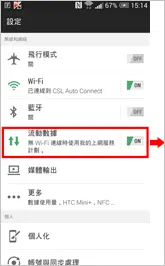
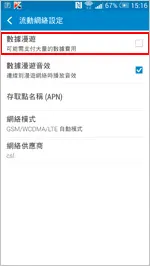
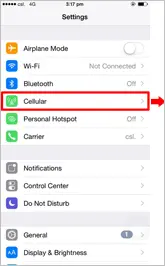
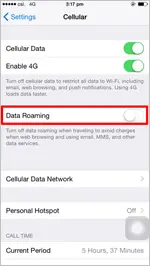
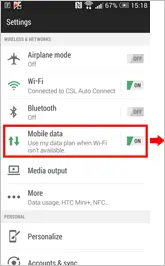
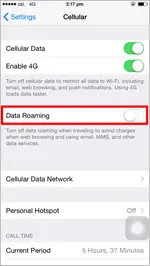
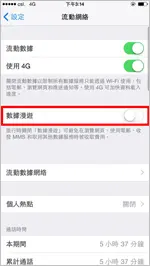
Steps how to disable the roaming data function
Using a mobile data service overseas will incur roaming charges. If you need to disable a handset's data feature, please refer to the following steps:(procedures and options may vary according to handset design)
Click "Settings" Click "Mobile Data" OFF the "Data Roaming"
iOS
Android
iOS

Android