





Apple Watch Family Sharing: Connect Family Members
The Family Sharing Setup Service allows you to assign a separate mobile number to a family member's Apple Watch from your own iPhone, enabling them to stay connected and allowing you to monitor their health and safety.
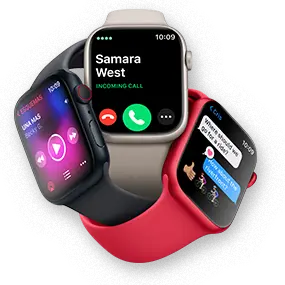
Family Sharing Setup Service enables you to assign an Apple Watch to a family member from your own iPhone

Supports 5G network to Enhance Speed and Performance #
The 5G network operates independently without relying on 4G infrastructure, fully unlocking the potential of 5G technology to deliver faster data speeds and lower latency.

Separate number of your choice
Establish a chosen mobile number for your family member’s Apple Watch, so he/she can stay in touch anytime via phone, messaging and data connectivity.

Share allowances
Share voice minutes and data usage with a family member to get better value for money and easier management.

Health care
View a family member’s health and activity remotely – e.g. heart rate – to be alerted to anomalies.

Safety care
This detects if a loved one has taken a fall, automatically calls the emergency services, alerts pre-listed contacts to an accident and pinpoints the loved one’s location.
Note:
To receive SMS, MMS, or push notifications fromthird-party apps on your Apple Watch with cellular, your paired iPhone must be powered on and connected to Wi-Fi or cellular.
Roaming outside your provider network coverage area
is not available for
Apple Watch (GPS + Cellular) even though your iPhone
plan may support roaming.
However, you will continue to be connected when your Apple Watch
is in proximity of your
iPhone or connected to Wi-Fi.
#Requires compatible specified devices and subscription to designated services
Family Sharing Setup Service Charge
| Charge Type | Service charge | |
|---|---|---|
| 5G network | 4G LTE network | |
| Month-to-month rate |
Promo Price:
HK$28/month*
(Regular HK$38/month) |
HK$28/month |
| Monthly rate with commitment period^ |
Promo Price:
HK$22/month
~*
(Regular HK$32/month) |
HK$22/month ~ |
* The Promotion offer is valid from 19 September 2025 to 31 December
2026.
^ Customers is required to subscribe to 24-month or longer commitment period.
~ HK$22 per month Service is applicable only to customers who subscribe to the
Service for a commitment period of 24/36 months (the "Commitment Period"). The
monthly fee of the Service for the first 6 months would be waived if customers
port-in the numbers to csl and 1O1O for Service Plan subscription. After the
Commitment Period, the 5G service will be automatically renewed on a monthly basis
at HK$38 per month, while the 4G LTE service will be automatically renewed on a
monthly basis at HK$28 per month.
Apple Watch eSIM Subscription Flow
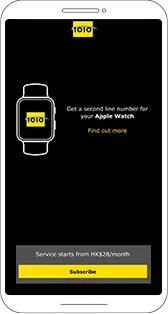
STEP 1
From iPhone:
- Open 'Watch' app to pair your Apple Watch
- Tap 'My Watch' from bottom left of 'Watch' app
- Tap 'Mobile Data'
- Tap 'Set Up Mobile Data'
- Tap 'Subscribe'
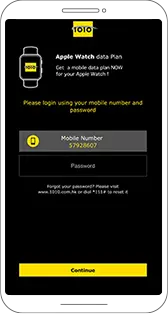
STEP 2
- Type in password of your mobile number
- Tap 'Continue'
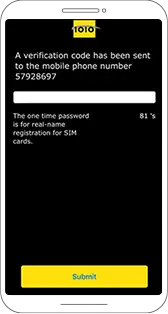
STEP 3
- Type in one-time password
- Tap 'Submit'
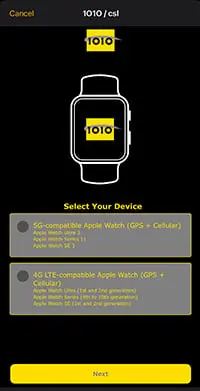
STEP 4
- Select Your Device
- 5G-compatible or 4G LTE-compatible Apple Watch - Tap 'Next'
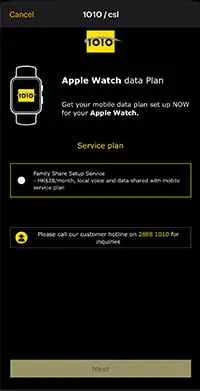
STEP 5
- Select 'Family Sharing Setup Service'
- local voice and data shared with mobile service plan - Read and accept the 'Terms and conditions'
- Tap 'Next'
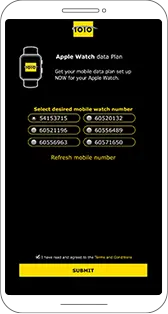
STEP 6
- Select desired mobile watch number or refresh mobile number
- Agree to the Terms & Conditions
- Tap 'Submit'
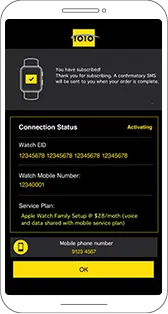
STEP 7
- Wait for the 'Activation done' message
- Tap 'OK' when finish'
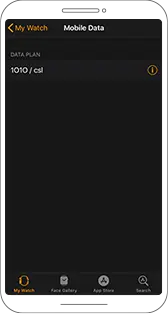
STEP 8
- Return to the 'Watch' app
- If you see 1O1O / csl
 icon next appears under
DATA PLAN then your Apple Watch is successfully connected.
Apple Watch eSIM訂購流程
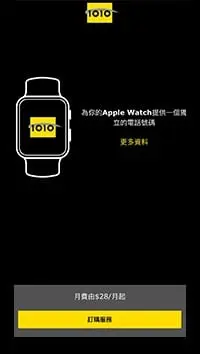
步驟1
從iPhone:
- 打開 “Watch” 應用程序,以配對您的 Apple Watch
- 點擊 “Watch” 應用程序左下角的 “我的手錶”
- 點擊 “流動網絡”
- 點擊 “設定流動網絡”
- 點擊 “訂購服務”
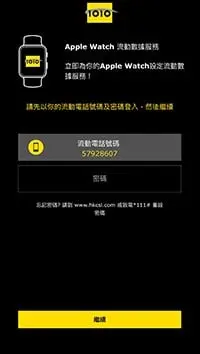
步驟2
- 輸入您的手機號碼的密碼
- 點擊 “下一步”
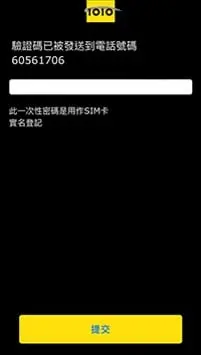
步驟3
- 輸入驗證碼
- 點擊“提交”
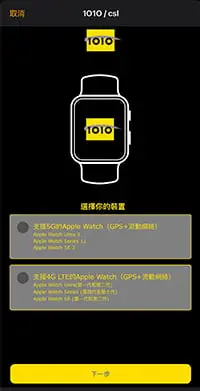
步驟4
- 選擇您的裝置
- 支援5G 或4G LTE的Apple Watch - 點擊“提交”
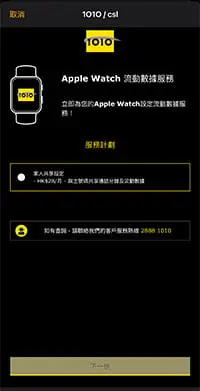
步驟5
- 選擇 “家人共享設定服務”
- 與主號碼共享通話分鐘及流動數據 - 閱讀並接受 “服務條款及細則”
- 點擊 “下一步”
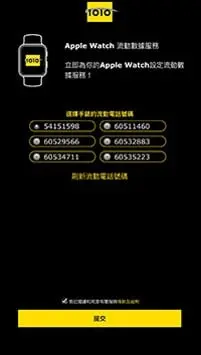
步驟6
- 選擇手錶的流動電話號碼或可選擇刷新流動電話號碼
- 閱讀並接受 “服務條款及細則”
- 點擊 “提交”
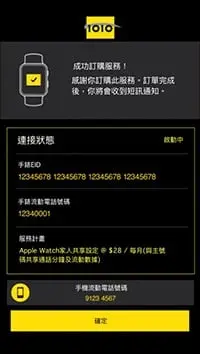
步驟7
- 等待 “成功訂購” 信息
- 完成後點擊 “確認”
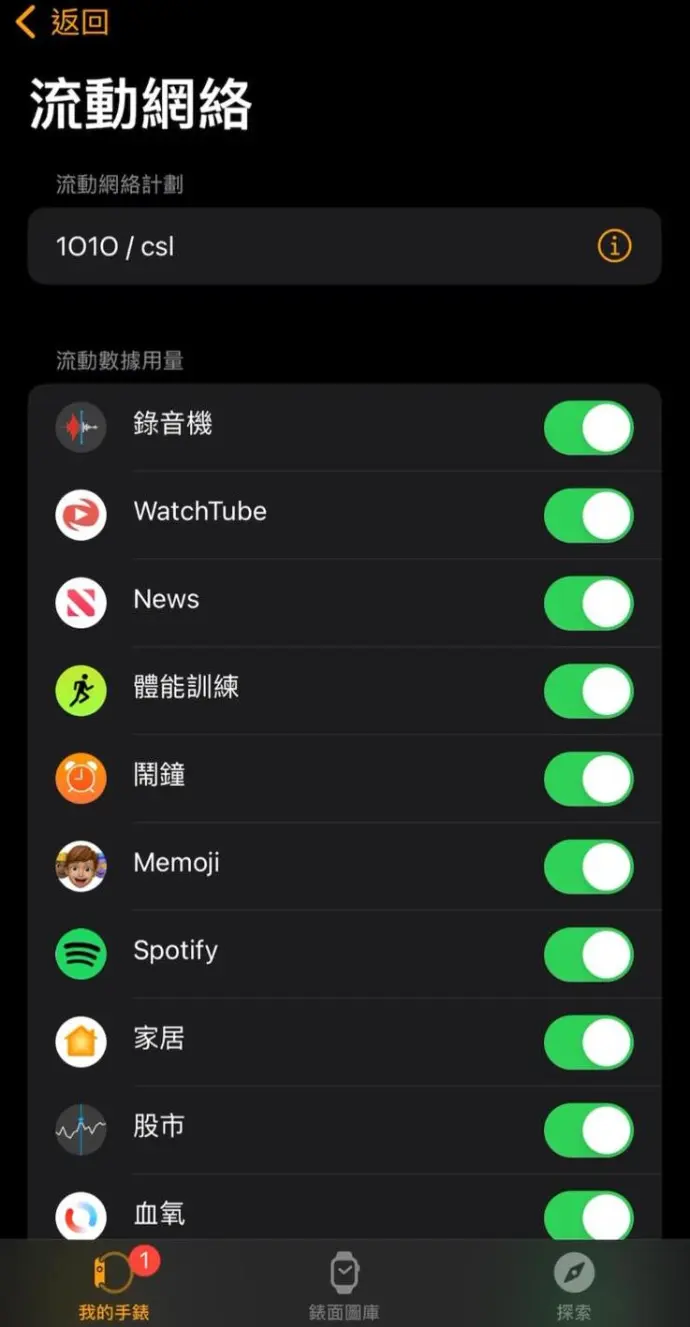
步驟8
- 返回到 “Watch” 應用程序
- 如果您看到流動數據計劃下出現 csl 圖標

這代表 Apple Watch 已成功連接.
Basic Requirements & FAQs
| Device | 5G Network | 4G LTE Network |
|---|---|---|
| iPhone | iPhone 11 or later and running on iOS 26 or newer | iPhone 6s or later and running on iOS 14 or newer |
| Apple Watch | Apple Watch Series 11 / SE 3 / Ultra 3 (GPS + Cellular) and running on WatchOS 26 or newer | Apple Watch Series (4th to 10th generation) / SE (1st and 2nd generation) / Ultra (1st and 2nd generation) (GPS + Cellular) and running on WatchOS 7 or newer |
Note: To check if your service plan is eligible, dial *163# using the iPhone that you want to use with your Apple Watch. You will receive an SMS with eligibility information.

When a customer starts the Apple Watch eSIM subscription process via Apple Watch, the system will check whether the customer has completed Real-name Registration. If not completed, the system will send the customer a text message through their mobile number. By clicking on the SMS link, the customer can submit his/her identity documents to complete Real-name Registration. Upon successful registration, he/she can subscribe to the Apple Watch eSIM immediately. If personal info needs updating before submitting Real-name Registration, review results will be sent by SMS or email within 3 working days.
Please note you need to enter a one-time password to verify your identity as part of the self-subscription flow. For any enquiries, simply call our 24-hour Customer Service Hotline on 2888 1010.
If you have not completed Real-name Registration, please watch the following tutorial:
You can apply for up to 5 Family Sharing Setup services (and up to 10 device services total, including other wearables) for your primary Multi-User Service Plan (MUP).
| Service | Maximum number of eSIM
you can apply by categories of service |
|---|---|
| Apple Watch One Number Service;
Apple Watch International Roaming Service; Other Wearables One Number Service |
4 |
| Apple Watch Family Sharing Setup Service | 5 |
| iPad eSIM Data Sharing Service | 5 |
Yes. For switching the Family Sharing service to a new Apple Watch, you can re-download the eSIM via the iPhone 'Watch' app after pairing the new watch to restore service.
No. The Family Sharing Setup service does not support IDD service to make international calls.
No. The Family Sharing Setup service does not support making calls, receiving calls, or data roaming outside Hong Kong.
Yes. You can call "988" as usual via your Apple Watch to check your voicemail.
Yes, each Family Sharing Setup service subscription can only be paired with one Apple Watch. To enable the service on more than one Apple Watch, you must apply for a separate subscription and pairing for each watch.
No. If you change to use another iPhone with the same mobile number, you just need to re-pair your new iPhone with your Apple Watch to continue enjoying Family Sharing Setup service.
When the iPhone is not nearby, the Apple Watch connects automatically. Check the Control Center (by pressing the side button); if the cellular button on the top left turns green, your Apple Watch is successfully connected. The green bars indicate signal strength.
Service Terms and Conditions
- The Offer is valid from 19 September 2025 to 31 December 2026, both dates inclusive (the “Promotion Period”).
- In order to qualify for the Offer, you must subscribe to a designated 1O1O / csl mobile service plan (“Service Plan”), and use a 5G-compatible Apple Watch Series / Apple Watch SE 3 / Apple Watch Ultra 3 (GPS + Cellular) running on WatchOS 26 or newer and use a compatible iPhone 11 or later models running on iOS 26 or newer.
- During the Promotion Period, customers can subscribe to the Service at a promotional price HK$28 per month (with no commitment period). This service is available through the Watch app on your iPhone, over the phone via our 24-hour customer service hotline, or in person at any 1O1O Center or csl shop with one of our sales representatives.
- After the Promotion Period, customers can continue to enjoy Apple Watch Family Sharing Setup Service (the “Service”) at the regular price of HK$38 per month. The Service is automatically renewed until it is cancelled. If you want to terminate the Service during Promotion Period, 7 days prior notice is required before the end of Promotion Period. If you decide to terminate the Service after the end of Promotion Period, 30 days prior notice is required.
- The Offer is subject to availability while stocks last.
- Unless otherwise stated, the Offer cannot be used in conjunction with any other promotional or discount offer, and are non-transferable or exchangeable for cash or other products.
- The Offer is subject to further terms and conditions. For details, please visit https://1010.com.hk/apple_watch#familyshare or https://www.hkcsl.com/en/apple-watch-family-sharing-service-activation-and-support/.
- The General Terms and Conditions of CSL Mobile Limited (“CSL”) apply ( https://www.1010.com.hk/terms_and_conditions or https://www.hkcsl.com/en/service-terms-and-conditions/) to the relationship between CSL and you in respect of the mobile service.
- CSL reserves the right to vary or cancel the Offer and/or amend these Terms & Conditions at any time without notice.
- If there is any inconsistency between the Chinese and English versions of these terms and conditions, the English version shall prevail.
- In order to qualify for this Service, you must subscribe to a designated 1O1O / csl mobile service plan (“Service Plan”) and:
- For 4G LTE-compatible Apple Watches, you must use an Apple Watch Series (4th to 10th generation) / Apple Watch SE (1st and 2nd generation) / Apple Watch Ultra (1st and 2nd generation) (GPS + Cellular) running on WatchOS 7 or newer, and use a compatible iPhone 6s or later models running on iOS 14 or newer.
- For 5G-compatible Apple Watches, you must use an Apple Watch Series 11 / Apple Watch SE 3 / Apple Watch Ultra 3 (GPS + Cellular) running on WatchOS 26 or newer and use a compatible iPhone 11 or later models running on iOS 26 or newer.
- Your Apple ID, as it relates to the Apple Watch, must be configured to show you are a member of the same family as the holder of the iPhone’s Apple ID.
- Data used will be deducted from the Service Plan registered to your iPhone.
- Service fees & commitment period:
- For 4G LTE-compatible Apple Watches, HK$22 per month Service is applicable only to customers who subscribe to the Service for a commitment period of 24/36 months (the “Commitment Period”). The monthly fee of the Service for the first 6 months would be waived for new customers who port-in their numbers to 1O1O and csl upon Service Plan subscription. After the Commitment Period, the Service will be automatically renewed on a monthly basis at HK$28 per month or the latest prevailing price.
- For 5G-compatible Apple Watches, HK$32 per month Service is applicable only to customers who subscribe to the Service for a commitment period of 24/36 months (the “Commitment Period”). The monthly fee of the Service for the first 6 months would be waived for new customers who port-in their numbers to 1O1O and csl upon Service Plan subscription. After the Commitment Period, the Service will be automatically renewed on a monthly basis at HK$38 per month or the latest prevailing price.
- You can make or receive calls from the device using the mobile number assigned to the device.
- You can only use the Service on one device at a time. If you want to connect to another device, you can connect your device to the Service via the “Watch” app on your iPhone. Alternatively, you can purchase an additional Service to use with the new device on your iPhone.
- For a 5G network connection, Apple Watches that support 5G are required to use the 5G data service. 5G local data service may not completely cover all locations within the service area, depending on performance of local 5G network. Local data service will automatically switch to 4G LTE, or other technologies, in locations not covered by a 5G network.
- You can apply for up to 10 device services for your primary MUP. However, you are further subject to the maximum number of eSIM for each category of service as set out below:
Service Maximum number of eSIM
you can apply by
categories of serviceApple Watch One Number Service;
Apple Watch International Roaming Service;
Other Wearables One Number Service4 Apple Watch Family Sharing Setup Service 5 iPad eSIM Data Sharing Service 5 - The Service does not support international roaming.
- If you are subscribing by porting-in from another operator, please go to one of our shops in person.
- If you terminate your iPhone’s Service Plan, you are required to terminate your device’s Service by calling one of our customer service representatives.
- The Service is subject to CSL Mobile Limited’s Mobile Service Agreement. Please go to https://www.1010.com.hk/terms_and_conditions or www.hkcsl.com/en/mobile-service-agreement-consumer-customers/.
- In the event of inconsistency between the Chinese and English versions of these Terms & Conditions, the English shall prevail.
- In order to qualify for this service, you must subscribe to a designated csl / 1O1O mobile service plan ("Service Plan"), use an Apple Watch Series 4 or later running on watchOS 7 or newer, and use a compatible iPhone 6s or later running on iOS 14 or newer.
- Your Apple ID, as it relates to the Apple Watch, must be configured to show you are a member of the same family as the holder of the iPhone’s Apple ID.
- Data used will be deducted from the Service Plan registered to your iPhone.
- HK$22 per month Service is applicable only to customers who subscribe to the Service for a commitment period of 24/36 months (the "Commitment Period"). The monthly fee of the Service for the first 6 months would be waived if customers port-in the numbers to csl and 1O1O for Service Plan subscription. After the Commitment Period, the Service will be automatically renewed on a monthly basis at HK$28 per month.
- You can make or receive calls from the device using the mobile number assigned to the device.
- You can only use the Service on one device at a time. If you want to connect to another device, you can connect your device to the Service via the "Watch" app on your iPhone. Alternatively, you can purchase an additional Service to use with the new device on your iPhone.
- A maximum of five Services can be registered under a csl/ 1O1O primary mobile number (six mobile number services can be supported in total).
- You can apply for up to 10 device services for your primary MUP. However, you are further subject to the maximum number of eSIM for each category of service as set out below.
Service Maximum number of eSIM
you can apply by
categories of serviceApple Watch One Number Service;
Apple Watch International Roaming Service;
Other Wearables One Number Service4 Apple Watch Family Sharing Setup Service 5 iPad eSIM Data Sharing Service 5 - The Service does not support international roaming.
- If you are subscribing by porting-in from another operator, please go to one of our shops in person.
- If you terminate your iPhone’s Service Plan, you are required to terminate your device’s Service by calling one of our customer service representatives.
- The Service is subject to CSL Mobile Limited’s Mobile Service Agreement. Please go to https://www.1010.com.hk/en/terms_and_conditions.
- In the event of inconsistency between the Chinese and English versions of these Terms & Conditions, the English shall prevail.