





Activate eSIM on Your Android Watch
Connect your LTE-enabled Android smartwatch to your mobile network and enjoy full independence from your phone.
Demo shows how to activate an eSIM into an Android watch: Galaxy Watch (LTE)
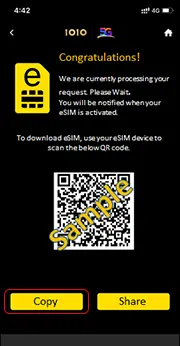
User can copy & paste the activation code onto
“Galaxy Wearable”
app.
Tap
Setting > Mobile network > Use Code >
Got a activation code
and then input it there
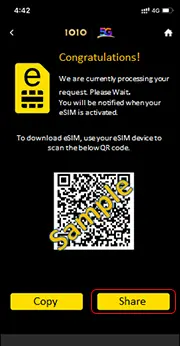
User can
“Share”
the QR code to other device,
then use your SS-watch-paired device to scan the QR code via
“Galaxy Wearable”
app.
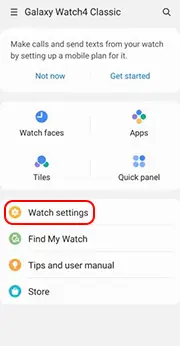
Pair up the Samsung Watch by
“Galaxy Wearable”
app
Tap “
Watch settings”
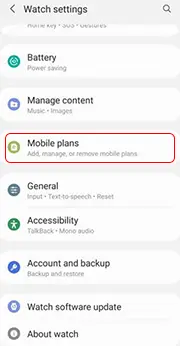
Tap “Mobile plans”

Wait for Samsung to look for server
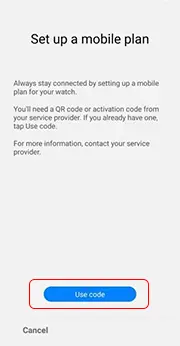
Tap “Use code” to scan QR code
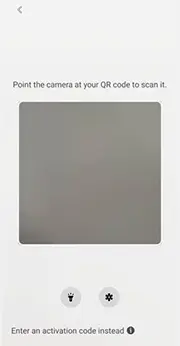
Scan the QR code generated from 1O1O App

Tap “Use plan”
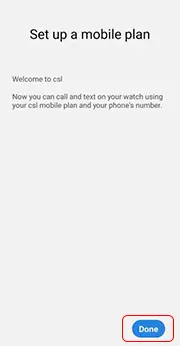
Tap
“Done”
Samsung Watch will auto-reboot
After reboot. Samsung Watch connects to the
“Galaxy Wearable”
app again
示範如何將 eSIM 安裝至 Android 手錶:Galaxy Watch (LTE)

用戶可按下 “複製” 並自行在 “Galaxy Wearable” app 內貼上啟動碼。
點選 設置 > 流動網絡 > 使用代碼 > 已取得啟動碼,然後輸入啟動碼。

用戶可以 “分享” 二維碼至另一部設備,
然後用已配對三星手錶的裝置,透過 “Galaxy Wearable” app 掃瞄此碼。
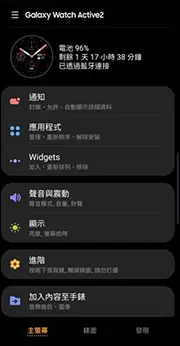
使用 “Galaxy Wearable” app 與手錶配對,向下滾動。
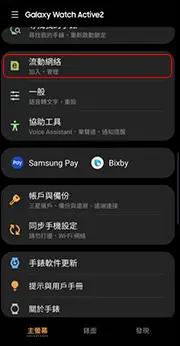
點選 “流動網絡”

等待 Samsung 服務器回應

點選 “使用代碼” 打開 QR code 掃描啟動碼。

點選 “已取得啟動碼嗎?”

點選 “連接” 開始下載 eSIM。

點選 “完成”
三星手錶將自動重啟。
重啟後,三星手錶將再次連接到 “Galaxy Wearable” app。