





Activate eSIM on Your Android Watch
Connect your LTE-enabled Android smartwatch to your mobile network and enjoy full independence from your phone.
Other Wearables One Number Service eSIM Subscription Steps for Android Watch
When customer starts the Other Wearables Service eSIM subscription process via the 1O1Oapp, the system will check whether the customer has completed Real-name Registration. If not completed, the system will send the customer a text message. By clicking on the SMS link, customer can submit his/her identity documents to complete Real-name Registration, upon successful Real-name Registration, he/she can subscribe Other Wearables Service eSIM immediately. If personal info needs updating before submitting Real-name Registration, review results will be sent by SMS or email within 3 working days. Please note you need to enter a one-time password to verify your identity as part of the self-subscription flow. For any enquiries, simply call our 24-hour Customer Service Hotline on 2888 1010.
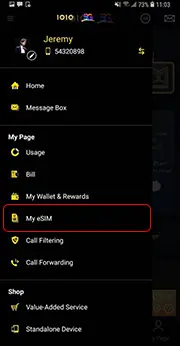
Tap “My eSIM”
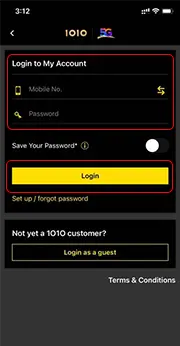
Enter mobile number, password.
Tap
“Login”
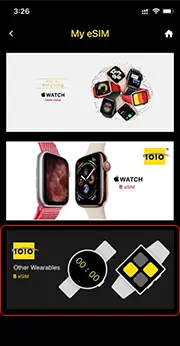
Select “Other Wearables eSIM”
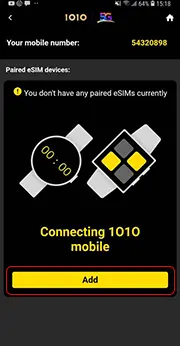
Tap "Add"
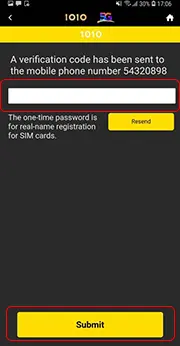
Enter one-time password
Tap
“Submit”
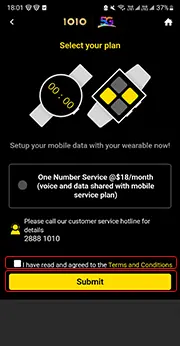
Read and confirm T&C
Tap
“Submit”
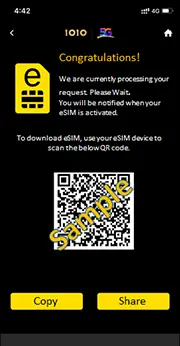
Scan QR code and download eSIM
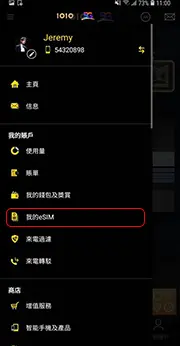
點選 “我的eSIM”
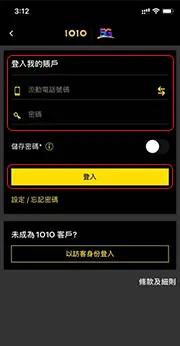
輸入流動電話號碼, 密碼
點選
“登入”
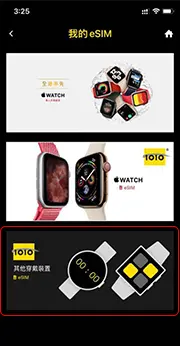
點選 “其他穿戴裝置 eSIM”
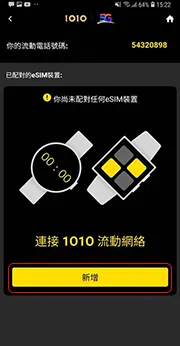
點選 “新增”
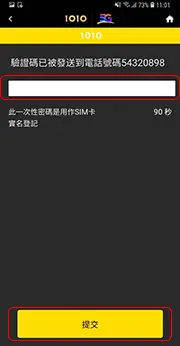
輸入一次性密碼
點選
“提交”
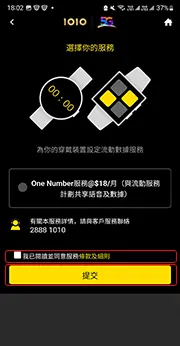
閲讀並同意條款及細則
點選
“提交”
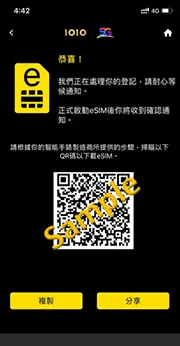
掃描二維碼,並下載eSIM