





Activate eSIM on your Android
Follow these simple steps to set up and activate your eSIM using a QR code on your Android device.
eSIM set-up and activation on Android phones using QR code (example: Galaxy Z Flip)

Tap “Settings”
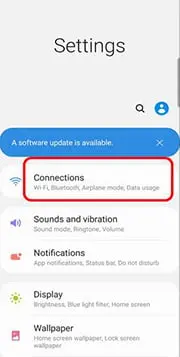
Tap “Connections”
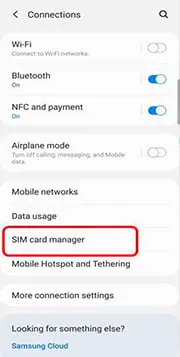
Tap “SIM card manager”
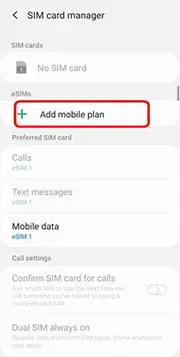
Tap “Add mobile plan”
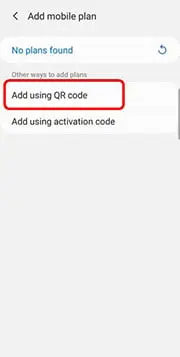
Tap “Add using QR code” / ”Add using activation code”

Scan the QR code from eSIM Voucher to register
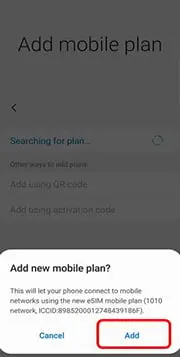
Tap “Add” for new mobile plan
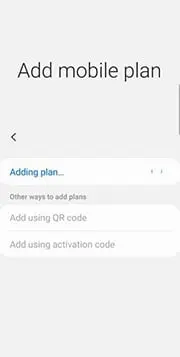
“Adding plan…” is shown
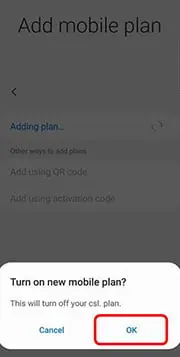
Tap “OK” for activate new mobile plan
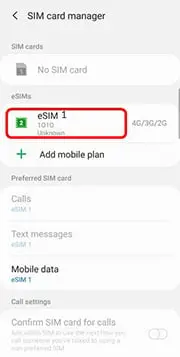
After activation, you will see the new eSIM loaded and used
於 Android 手機使用 QR code 設定和啟動 eSIM 方法

點選 “設定”

點選 “連接”
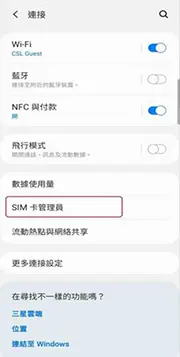
點選 “SIM 卡管理員”
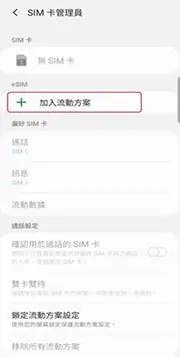
點選 “加入流動方案”

點選 “使用 QR 碼加入” / “使用啟動碼加入”

使用裝置掃描在 eSIM Voucher 上的 QR code

點選 “加入” 以新增流動方案

畫面顯示 “正在加入方案…”

點選 “確定” 以啟動新流動方案
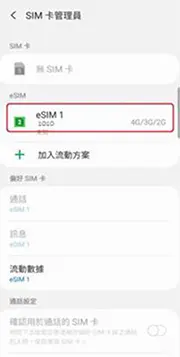
完成啟動後, 會看到新eSIM 載入並使用網絡中